What is cloud accounting? How cloud-based financial software works
What happens when your finance team no longer has to rely on desktop-based systems, manual updates, or disconnected data?
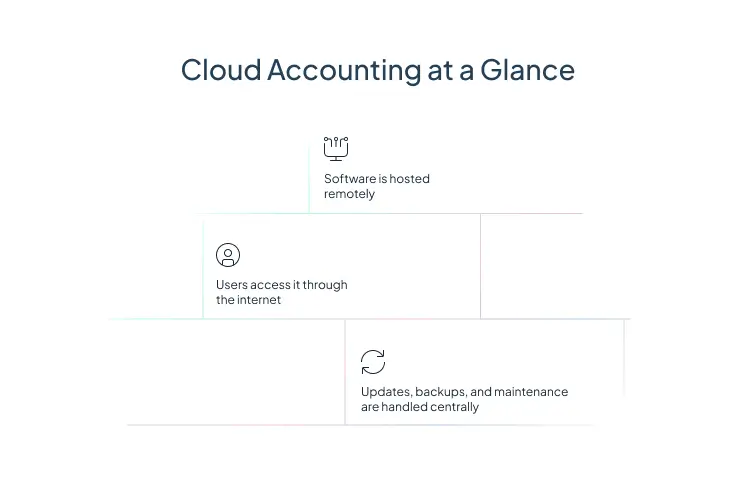
Cloud accounting software helps businesses manage core financial tasks through internet-based applications instead of locally installed systems. The basic idea is familiar to anyone who has used traditional accounting software, but the delivery model is different: the software is hosted remotely, accessed through the web, and updated by the provider rather than maintained on each company device. Cloud accounting is increasingly seen as part of a broader shift toward connected, collaborative finance operations built on SaaS-based delivery models.
How does cloud accounting differ from traditional on-premise accounting?
- Cloud accounting software is accounting software delivered through the cloud, usually in a SaaS model.
- It gives finance teams real-time access to financial data from anywhere with the right permissions.
- Key benefits include accessibility, automation, collaboration, scalability, and easier maintenance.
- Compared with traditional systems, cloud-based accounting usually reduces infrastructure overhead and simplifies updates.
- The strongest platforms do more than bookkeeping. They connect accounting with billing, reporting, CRM, projects, and broader financial management workflows.
What is Cloud Accounting Software?
Cloud accounting software operates much like traditional accounting software, but instead of being installed and maintained on local machines or on-premises servers, it runs on remote infrastructure and is accessed over the internet. In practice, that means users log in through a browser or app, work with shared data in real time, and rely on the provider for maintenance, updates, and system availability.
Users often rely on spreadsheets for financial planning because of their simplicity and familiarity

That model aligns with the standard NIST definition of cloud computing, which emphasizes on-demand access to shared computing resources with minimal management effort. For finance teams, that translates into faster access to current data, less dependence on local infrastructure, and a simpler path to system-wide consistency.
Cloud accounting is often the first step toward broader cloud-based financial management. Once finance data is centralized, businesses can connect accounting with revenue management, billing, forecasting, reporting, and operational workflows instead of treating accounting as a standalone back-office function.
What are the Key Benefits of Cloud Accounting?
One of the biggest advantages of cloud accounting software is accessibility. Teams in finance, operations, leadership, and other departments can work from the same live system without waiting for files to be emailed around or manually synced. This cross-functional access is widely recognized as a key benefit, especially for distributed teams and growing organizations.
Another major benefit is collaboration. When multiple users can work in the same environment using the same data set, month-end close, approvals, reporting, and forecasting tend to move faster. That matters even more now, when many businesses expect finance teams to support decision-making across departments rather than simply record transactions.
Automate. Connect. Transform.

Cloud accounting also improves business agility. Subscription-based delivery usually lowers upfront infrastructure requirements, while scalable architecture makes it easier to add users, entities, or transaction volume as the business grows. The result is a finance environment that can adapt without a major system rebuild every time the company changes shape.
Security and resilience are also part of the value. Strong cloud providers typically invest heavily in encryption, controlled access, backups, and centralized patching. CISA’s cloud security guidance reinforces that secure cloud use depends on disciplined identity, access, and configuration practices, which is one reason modern finance teams increasingly prioritize platforms with mature governance capabilities.
Pro Tip: When comparing cloud accounting software, do not look only at accounting features. Ask how the platform handles permissions, auditability, integrations, backups, and workflow controls. Those factors often determine whether the system will still fit once your finance operations become more complex.
What are the Key Features of Cloud Accounting?
The best cloud accounting software usually includes a similar core set of capabilities, even if vendors package them differently.
Reporting and visibility
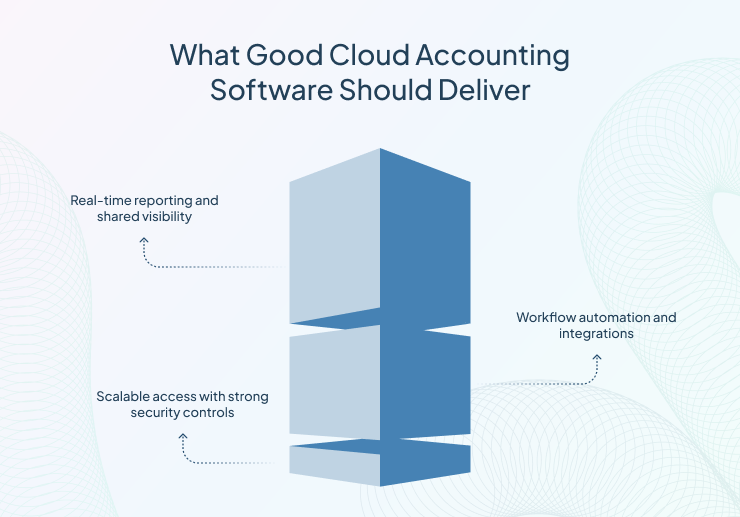
Cloud accounting platforms support financial statements, dashboards, KPI tracking, and operational reporting. Because the data is updated centrally, reporting is usually more current and easier to share across teams.Reporting and visibility are widely recognized as foundational features of cloud accounting systems.
Accessibility
Users can review data, approve workflows, and perform accounting tasks from different devices and locations. This is one of the clearest distinctions between cloud-based accounting and older on-premises setups.
Real-time data
Cloud accounting software updates shared records continuously, which helps reduce delays between transaction activity and financial visibility. For finance leaders, that supports faster decisions and tighter control over cash, billing, and performance.
Automation
Modern systems automate recurring tasks such as reconciliations, invoice creation, expense capture, approval routing, and reminders. This reduces manual work and helps finance teams spend more time on analysis instead of repetitive processing.
Integration
Cloud accounting solutions often connect with CRM, payment systems, inventory tools, and other business applications. This matters because disconnected systems create duplicate entry, inconsistent reporting, and avoidable delays.
Scalability and security
As businesses grow, cloud systems can usually support higher transaction volumes, more users, and more complex structures without requiring the same level of hardware investment as traditional systems. Security controls, centralized maintenance, and provider-managed updates are also major reasons many organizations choose cloud-based accounting in the first place.
Cloud Accounting vs Traditional Accounting Software
Cloud accounting and traditional accounting software serve the same basic purpose, but they differ in how they are accessed, maintained, and used across different environments, teams, and business needs.
|
Feature |
Cloud Accounting Software |
Traditional Accounting Software |
|
Deployment |
Hosted online |
Installed locally |
|
Access |
Web-based, anywhere access |
Usually device or office bound |
|
Updates |
Automatic provider updates |
Manual updates required |
|
Maintenance |
Lower IT burden |
Higher IT involvement |
|
Collaboration |
Easier real-time sharing |
Limited shared access |
|
Data Visibility |
Live, centralized data |
Often delayed or siloed |
|
Cost Model |
Subscription-based |
Higher upfront cost |
|
Scalability |
Easier to scale |
Harder to expand |
|
Automation |
More built-in automation |
Often more manual |
|
Analytics |
Stronger real-time insights |
More limited reporting |
The clearest difference is how the software is delivered. Traditional accounting software is commonly installed on local infrastructure and maintained by the business or its IT team. Cloud accounting software is hosted remotely and accessed online. That affects everything else, including maintenance, collaboration, cost structure, and scalability.
Traditional systems can still work for certain businesses, especially those with stable requirements and existing on-premises investments. But they often require more manual upkeep, more direct IT support, and more effort to keep users working from the same current data.
Why PSA Matters

Cloud-based accounting, by contrast, typically offers automatic updates, broader access, easier collaboration, and a more flexible subscription model. Cloud accounting solutions often offer advantages such as flexible ledgers, automated billing processes, and more advanced analytics capabilities compared to many legacy systems.
Pro Tip: If you are replacing a traditional system, map your current pain points before evaluating vendors. Common examples include delayed reporting, manual billing steps, limited visibility across entities, and weak CRM or project integration. This makes software selection more practical and less feature-list driven.
Why Choose Cloud Accounting on Salesforce Platform?
For businesses already running key operations on Salesforce, accounting on the same platform can remove a great deal of friction. Certinia positions this advantage around a shared data model, familiar user experience, and tighter coordination between sales, services, and finance. Many platforms highlight workflows such as creating invoices or sales orders directly from sales opportunities and connecting the opportunity-to-cash process more efficiently.
That kind of platform alignment matters because finance rarely works in isolation. Revenue, billing, delivery, customer records, and reporting all affect one another. When cloud accounting software sits closer to the operational systems that generate financial activity, teams can reduce handoff delays, limit manual re-entry, and improve the accuracy of downstream reporting.
For service-centric organizations in particular, the value is not just that the software lives in the cloud. It is that cloud-based accounting becomes part of a connected financial management strategy. Instead of treating accounting as a separate system of record, businesses can use it as part of a broader operational and customer lifecycle view.
Ready to simplify the path from opportunity to cash?