
What is cloud ERP? How it works, benefits, and drawbacks
Cloud ERP is no longer just an alternative to on-premises ERP. It has become the preferred path for finance and operations teams that need better visibility, faster reporting, and systems that can scale as the business grows.
According to Gartner, cloud adoption continues to accelerate as organizations prioritize agility and cost optimization in their IT strategies.
For CFOs and CIOs, the challenge is clear. Close cycles need to move faster; data must flow across departments, and core systems must connect with CRM, billing, and analytics tools without creating new silos. While on-premise ERP can still work for some organizations, cloud ERP is often better suited to businesses that want greater agility, easier access, and less operational strain on internal IT.
Cloud ERP matters because it helps businesses move away from disconnected systems, manual workarounds, and delayed reporting. Instead of relying on outdated processes, teams can work from a single connected system that brings finance, operations, and data together. This creates a stronger operational backbone that supports faster decisions, better visibility, and more consistent day-to-day execution.
What are the advantages and disadvantages of cloud ERP for finance teams?
- Cloud ERP is a centralized, internet-based system that manages finance, operations, and business processes in real time
- It replaces legacy infrastructure with scalable, subscription-based software
- It improves visibility, automation, and cross-team coordination across the business
- Implementation requires planning, data migration, and change management to succeed
- For most growing companies, cloud ERP delivers faster ROI than traditional ERP
Need a more agile, customer-focused financial management solution?
Simplify, streamline, and automate finance operations directly on the Salesforce platform.

What is Cloud ERP?
Cloud ERP is enterprise resource planning software that is hosted on remote servers and accessed through a web browser or online application. Instead of installing and managing the system on internal company infrastructure, organizations use a provider-managed platform delivered as a service. This makes it easier to access business data, roll out updates, and connect teams across locations through one centralized system.
At its core, cloud ERP helps businesses manage essential processes in a more connected and efficient way. Rather than relying on separate tools for finance, operations, reporting, and resource planning, companies can bring these functions together in one environment.
Key Components of Cloud ERP
Cloud ERP brings together several core modules that support and connect key business functions.
- Financial management: Supports core finance functions such as general ledger, accounts payable, accounts receivable, budgeting, and revenue recognition.
- Procurement and inventory management: Helps track purchasing, supplier activity, stock levels, and the movement of goods across the business.
- Project and resource management: Gives teams visibility into project timelines, staffing, utilization, and delivery performance.
- Reporting and analytics dashboards: Provides real-time visibility into financial and operational data, helping leaders make faster and better-informed decisions.
- Integration with CRM, HR, and other systems: Connects cloud ERP with other critical business platforms so data can move more smoothly across departments without creating silos.
Cloud ERP vs On-Premise ERP
Here’s a quick look at how cloud ERP and on-premise ERP differ in setup, cost, and day-to-day management.
|
Criteria |
Cloud ERP |
On-Premise ERP |
|
Deployment |
Hosted by vendor and accessed online |
Installed on internal company servers |
|
Cost |
Lower upfront cost, subscription-based |
Higher upfront cost-plus hardware and maintenance |
|
Updates |
Automatic vendor-managed updates |
Manual updates handled by internal IT |
|
Scalability |
Easier to scale as business grows |
Scaling often requires more infrastructure |
|
Accessibility |
Accessible from anywhere with internet |
Usually limited to office network or VPN |
Thus, Cloud ERP systems reduce IT overhead while improving accessibility and scalability. On-premises systems offer control but require ongoing maintenance.
Pro Tip: When comparing cloud ERP and on-premise ERP, look beyond deployment alone and evaluate how each model will affect cost, scalability, visibility, and long-term IT effort.
How Does Cloud ERP Work?
Cloud ERP operates on a SaaS model where the vendor hosts the application, manages the underlying infrastructure, and takes care of updates and system maintenance. This removes the need for internal IT teams to handle servers, upgrades, or system performance, allowing businesses to focus more on operations rather than system upkeep.
Instead of running software locally, users access the system through a secure web interface. Data is stored centrally, which means every department works from the same, up-to-date information. This is what enables faster reporting, better coordination, and fewer discrepancies across teams.
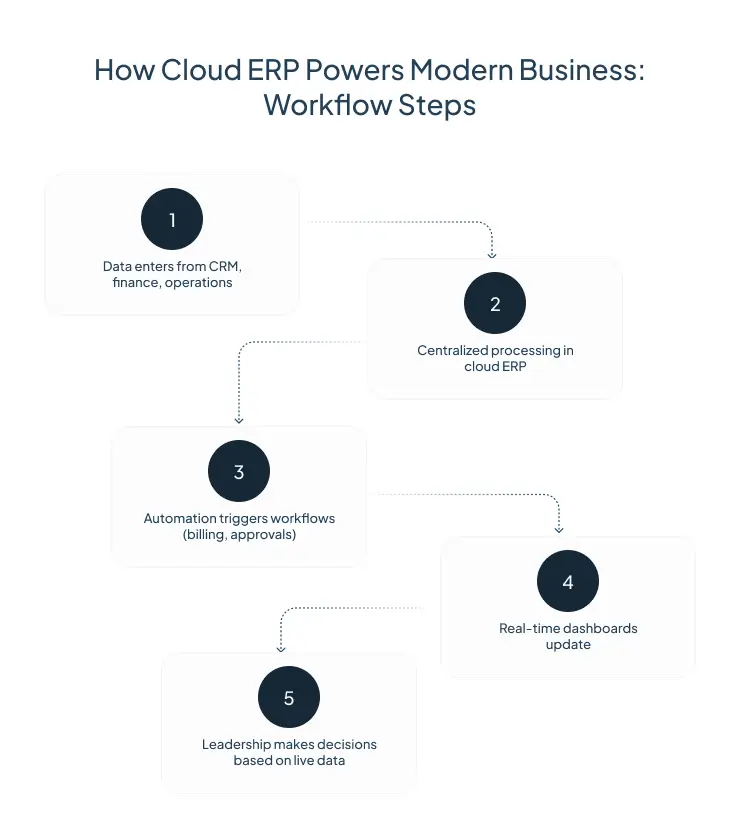
Core Architecture of Cloud ERP
The core architecture of cloud ERP defines how all business processes, data, and applications are unified into a single, scalable system accessible through the cloud.
- Multi-tenant environment
Multiple customers use the same underlying infrastructure, while their data remains securely isolated. This model allows providers to deliver updates efficiently and maintain consistent performance across users.
- Automatic updates and patches
System updates, security fixes, and new features are rolled out by the provider without requiring manual intervention. This ensures the system stays current without disrupting business operations.
- API-based integrations
Cloud ERP systems are designed to connect with other tools such as CRM, HR, billing, and analytics platforms. APIs make it easier to share data across systems and maintain a unified workflow.
- Centralized database
All business data is stored in one place, enabling real-time access across departments. This eliminates version conflicts and helps leadership make decisions based on accurate, current information.
What are the Key Benefits of Cloud ERP?
Among the most significant systems that organizations of all stripes, whether public or private, use is the Enterprise Resource Planning (ERP) system.
Source: World Journal of Electrical and Electronic Engineering
Cloud ERP gives organizations more than a new deployment model. It creates a stronger operational foundation by improving visibility, reducing manual effort, and making it easier for teams to work from the same set of data. For finance and operations leaders, the value often comes from how quickly the system can support growth, simplify processes, and improve day-to-day decision-making.
Scalability
One of the biggest benefits of cloud ERP is its ability to scale with the business. As companies expand into new markets, add legal entities, increase transaction volumes, or grow their teams, the system can adapt without requiring major infrastructure changes. Businesses can add users, modules, and capabilities more easily, which makes cloud ERP a practical choice for organizations planning for long-term growth.
Cost Efficiency
Cloud ERP can help reduce the heavy upfront investment often associated with traditional systems. Instead of purchasing and maintaining physical servers and other supporting infrastructure, companies typically pay through a subscription model that is easier to forecast and manage.
This can support cost efficiency through:
- Lower upfront technology investment
- Predictable ongoing software costs
- Reduced burden on internal IT teams
- Less spending on maintenance and system upgrades
While total costs still depend on scope and implementation, the financial model is often more flexible and easier to align with business growth.
Real-Time Data Visibility
Cloud ERP gives teams access to shared, up-to-date information across departments. Finance, operations, procurement, and leadership can work from the same data rather than relying on disconnected spreadsheets or delayed reports. This improves transparency and helps decision-makers respond faster to changes in performance, cash flow, project health, or operational demand.
For finance leaders, this means better reporting accuracy, quicker access to dashboards, and more confidence in the numbers being used to guide decisions.
Automation
Another major advantage of cloud ERP is the ability to automate routine and repetitive processes. Tasks such as invoicing, approval of workflows, reconciliations, data entry, and reporting can often be handled with less manual intervention. This reduces administrative workload, lowers the risk of human error, and allows teams to spend more time on analysis and strategic work instead of repetitive processing.
Over time, automation can also improve consistency by ensuring that key workflows follow defined rules and steps.
Remote Accessibility
Because cloud ERP is accessed online, users can work from anywhere with the right permissions and internet connection. This is especially valuable for businesses with distributed teams, multiple offices, field operations, or global entities. Employees are not tied to a single office network, and leaders can review financial or operational data without needing to be in a specific location.
This level of accessibility supports faster collaboration, better continuity, and more flexibility in how teams operate across the business.
Pro Tip: Focus on the benefits that solve your biggest operational gaps first, because the real value of cloud ERP comes from how well it supports your specific business needs.
Potential Drawbacks and Considerations of Cloud ERP
While cloud ERP offers clear advantages, it is important to understand the potential challenges and considerations before making a decision.
Data Security Concerns
Security is often the first concern. Reputable providers invest heavily in encryption, compliance, and monitoring. In many cases, their security posture exceeds what individual companies can maintain internally.
Customization Limits
Cloud ERP systems are designed for standardization. Deep customization may be limited compared to on-premise systems. However, modern platforms offer configuration and extensibility through APIs.
Migration Complexity
Moving from legacy systems requires:
- Data cleansing
- Process redesign
- User training
This phase can be resource-intensive but is critical for long-term success.
Who Should Use Cloud ERP?
Cloud ERP is suitable across industries, but the value becomes clear in specific scenarios:
Mid-Market Companies
- Outgrowing spreadsheets or entry-level systems
- Need for integrated finance and operations
Enterprise Organizations
- Managing multiple entities or geographies
- Requiring real-time consolidation and reporting
Industry Use Cases
- Professional services: project tracking and billing
- Manufacturing: inventory and supply chain visibility
- SaaS companies: revenue recognition and subscription billing
Cloud ERP Implementation Best Practices
|
Best Practice |
What to Focus On |
|
Planning |
Set clear goals, identify process gaps, and align stakeholders early |
|
Change Management |
Support adoption through training, communication, and internal buy-in |
|
Vendor Selection |
Assess industry fit, integration strength, support, and long-term roadmap |
|
Timeline Expectations |
Allow enough time for migration, testing, and user readiness |
Key Takeaways
Cloud ERP has shifted from a technology upgrade to a business necessity. It brings finance, operations, and data into a single system that supports faster decisions and better control.
For organizations dealing with fragmented systems or limited visibility, cloud ERP offers a clear path forward. The real value lies not just in cost savings, but in how it enables teams to operate with clarity and confidence.
For companies evaluating their next phase of growth, cloud ERP is less about replacing software and more about building a stronger operational foundation.
Ready to simplify the path from opportunity to cash?